 admin
admin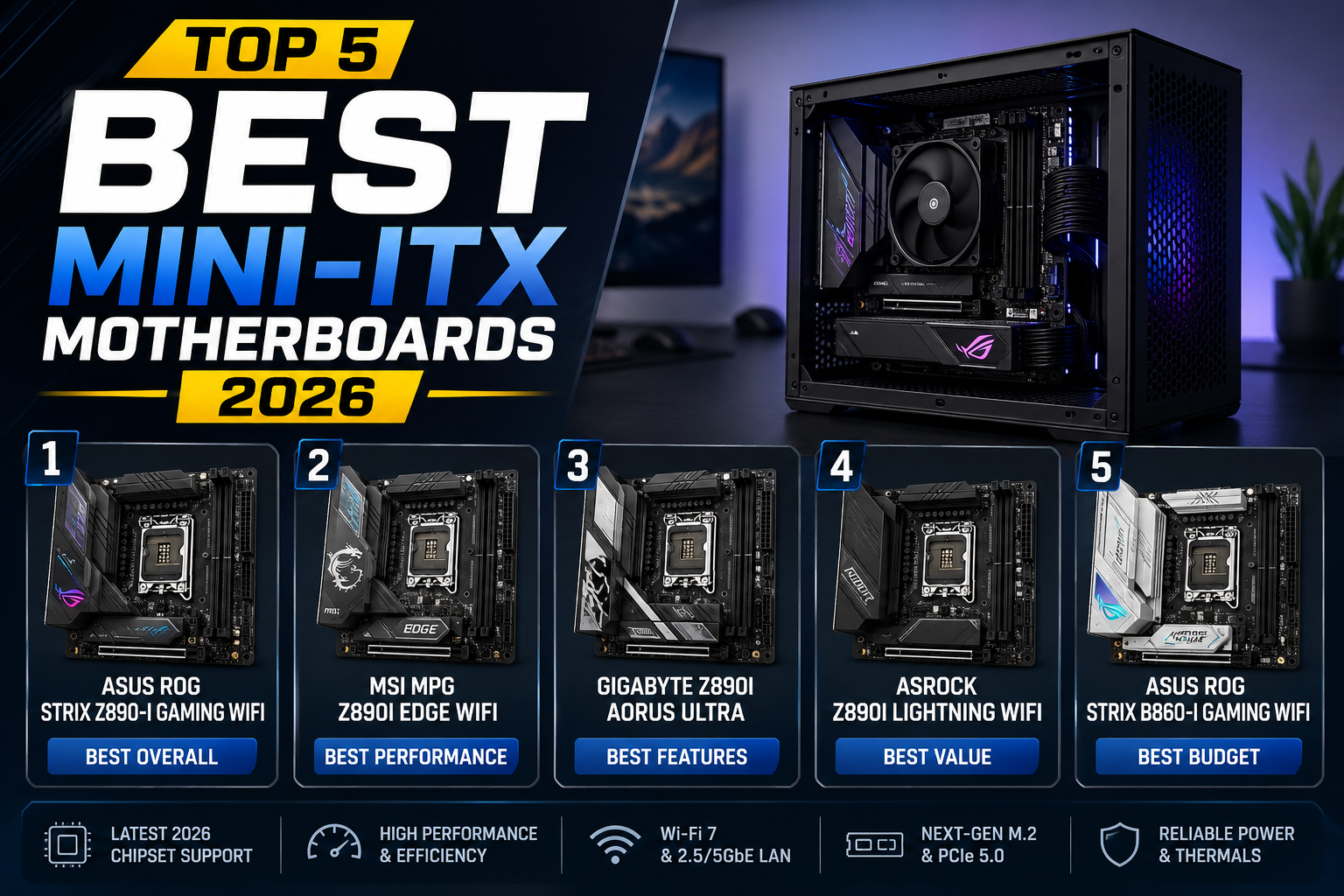
Kya aap ek powerful PC banana chahte ho — lekin room mein jagah bilkul kam hai?
Ya shayad aap ek clean, stylish small form factor gaming rig banana chahte ho jo desk par acchi lag sake? Toh aap sahi jagah aaye ho!
Aaj ke time mein, chhote aur powerful PCs ki demand bahut tezi se badh rahi hai. Office desk ho, gaming setup ho, ya living room HTPC — compact builds ne sabko impress karna shuru kar diya hai. Aur isi demand ke sath best Mini-ITX motherboard ki zaroorat bhi ekdum rocket ki tarah upar gayi hai.
Lekin market mein itne saare options hain ki aksar log confuse ho jaate hain. Kaunsa board khareedein? Intel ya AMD? Budget kitna set karein? In tamam sawaalon ka jawab aaj hum is article mein denge.
Is complete guide mein hum cover karenge: Mini-ITX kya hota hai, iske fayde, aur 2026 ke top 5 best Mini-ITX motherboards — unki full specs, pros-cons, aur real-life use cases ke saath. Chalte hain!
Table of Contents
- Mini-ITX Kya Hota Hai? — Basics
- Mini-ITX Ke Fayde Aur Limitations
- Top 5 Best Mini-ITX Motherboards 2026
- Quick Comparison Table
- Kaunsa Board Chunein? — Smart Buying Guide
- FAQ — Aksar Puche Jaane Wale Sawaal
- Conclusion — Final Advice
Mini-ITX Kya Hota Hai? Basics Seedhe Samjhte Hain
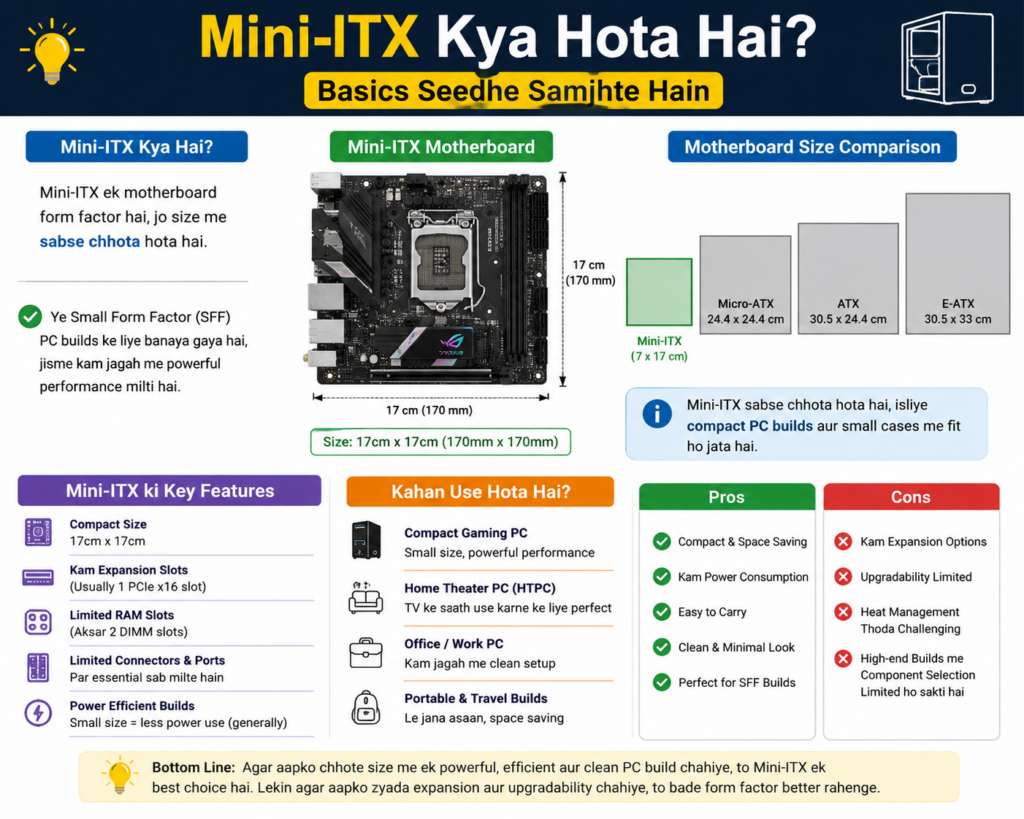
Mini-ITX ek motherboard form factor hai jiska size sirf 170mm × 170mm hota hai. Yani — ek standard ATX motherboard se lagbhag 4 guna chhota! Iska seedha matlab hai ki aap ek bahut compact PC case mein bhi full-power desktop processor aur DDR5 RAM asaani se use kar sakte ho.
Real-life example ke tor par socho: agar aapke desk par jagah sirf ek shoe-box jaisi hai, aur aap chahte ho ki wahan ek proper gaming PC ho — toh Mini-ITX hi aapka jawab hai. Bahut log isko living room ke saath connect karte hain, ya office ke desk ke neeche quietly rakh dete hain.
Pro Tip: Mini-ITX boards mein zyaadatar sirf ek PCIe x16 slot aur 2 RAM slots hote hain. Isliye planning smart honi chahiye — single GPU gaming setups ke liye yeh ekdum perfect hai.
Mini-ITX Ke Fayde Aur Limitations — Honest Breakdown
Fayde (Advantages)
- Compact size: Chhoti jagah mein easily fit hota hai
- Stylish look: Modern ITX cases bahut attractive lagte hain
- Power efficient: Chhota board = thodi kam power consumption
- Portable: LAN parties ya travel ke liye easy to carry
- Full performance: Same processor jo ATX mein — same performance
Limitations
- Sirf 2 RAM slots: Maximum 64GB (2x32GB DDR5) possible hai
- Single GPU slot: Multi-GPU possible nahi
- Cable management tricky: Chhoti jagah mein cables organize karna thoda mehnat ka kaam hai
- Thoda mehnga: Same chipset ATX board se Mini-ITX thodi zyada cost karta hai
Top 5 Best Mini-ITX Motherboards 2026
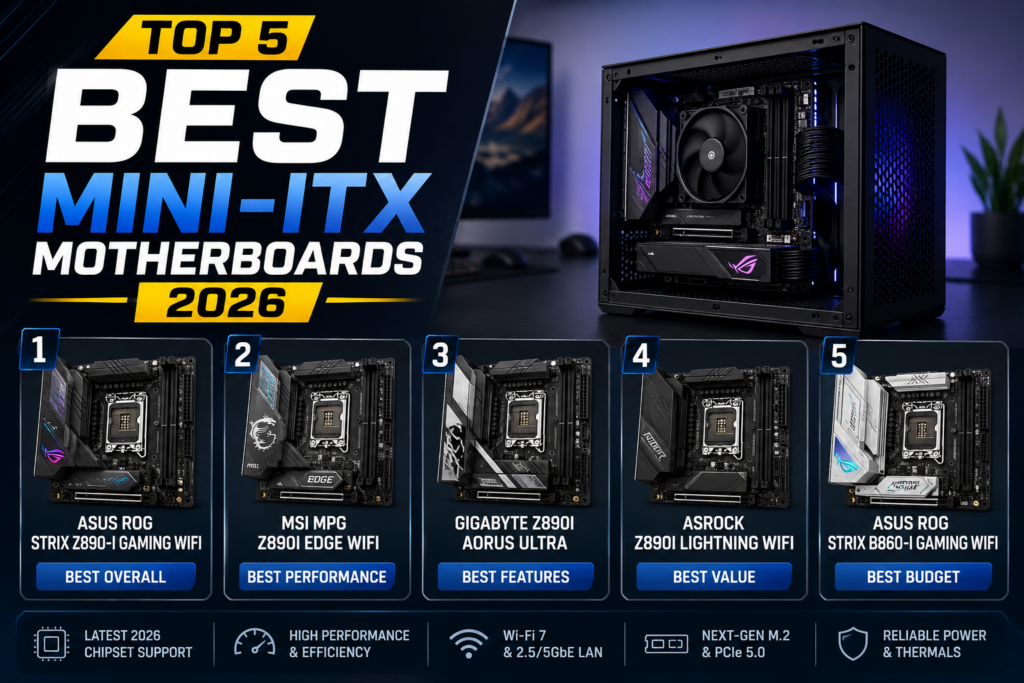
In boards ko real-world benchmarks, user reviews, expert testing aur price-to-performance ke basis par carefully shortlist kiya gaya hai.
1
ASUS ROG Strix Z890-I Gaming WiFi
Editor’s Pick
Gaming Ka Undisputed King — Intel Platform
Agar aap Intel 14th ya 15th Gen processor ke saath ek no-compromise Mini-ITX gaming build banana chahte ho, toh ROG Strix Z890-I se better koi option nahi hai. Iska robust VRM system itna capable hai ki Core i9 processor bhi bina sweat ke handle ho jaata hai.
Isme ek chhota sa OLED display bhi hota hai jo CPU temperature aur system stats real-time mein dikhata hai — yeh feature beginners aur enthusiasts dono ko bahut pasand aata hai.
Z890 ChipsetPlatform Chipset
DDR5-8000+RAM Support
WiFi 7Wireless
PCIe 5.0 x16GPU Slot
Thunderbolt 5Ports
2x M.2 Gen5Storage
Pros
- Excellent overclocking support
- WiFi 7 + Bluetooth 5.4 built-in
- OLED display for live stats
- Thunderbolt 5 port available
Cons
- Premium price (~₹35,000+)
- Gets warm under sustained load
- Overkill for casual use
Best for: Hardcore gamers aur enthusiasts jo Intel platform par invest karna chahte hain aur best Mini-ITX motherboard gaming ke liye dhundh rahe hain.
2
MSI MEG X870E Ace Mini-ITX
AMD Best
AMD Ryzen 9000 Series Ka Zabardast Partner
AMD lovers ke liye yeh board ek dream come true hai. Ryzen 9000 series ke saath pair karo aur performance ekdum next-level ho jaati hai. ECC memory support bhi milti hai, jo workstation users ke liye ek bada plus point hai.
Real-life example: Ek video editor jo Premiere Pro mein 4K footage edit karta hai — uske liye Ryzen 9 9900X + MSI MEG X870E ek killer combination ban jaata hai.
X870E ChipsetPlatform Chipset
DDR5-7200RAM Support
WiFi 7Wireless
2x M.2 Gen5Storage
ECC SupportMemory Type
AM5 SocketCPU Socket
Pros
- Ryzen 9000 fully supported
- Dual M.2 Gen5 NVMe slots
- Rock-solid long-term stability
- ECC memory support
Cons
- BIOS update initially required
- Slightly bulky for ITX form factor
Best for: AMD fans jo Ryzen 9 processor ke saath maximum performance chahte hain — gaming aur workstation dono ke liye.
3
Gigabyte Z790I Aorus Ultra Lite
Value Pick
Mid-Range Ka Solid Champion
Premium features chahiye lekin budget tight hai? Gigabyte Z790I Aorus ek solid choice hai. Core i7 13700K ya i5 14600K ke saath yeh board ekdum smooth karta hai aur gaming mein koi noticeable compromise nahi deta.
Clean aur minimal design ki wajah se yeh board stylish white ya black ITX cases mein bhi ekdum fit lagta hai. Aesthetics matter karta hai, hai na?
Z790 ChipsetPlatform Chipset
DDR5-7600RAM Support
WiFi 6EWireless
PCIe 4.0 M.2Storage
USB4 40GbpsI/O
LGA 1700CPU Socket
✅ Pros
- Competitive price (~₹20,000–22,000)
- Solid VRM for i7 builds
- Clean, minimal aesthetic
- USB4 support built-in
Cons
- No Thunderbolt 5
- Fewer fan headers than premium boards
Best for: Mid-range gamers aur everyday power users jo best Mini-ITX motherboard affordable price par chahte hain.
4
ASRock B850M-ITX/ac
Beginner Friendly
Pehli Baar PC Bana Rahe Ho? Yeh Hai Tumhara Board
First-time PC builders ke liye ASRock B850M-ITX ek tension-free entry point hai. Simple BIOS navigation, clear documentation aur achi compatibility list ke saath yeh board beginners ko overwhelm nahi karta.
Ek student jo pehla gaming PC bana raha hai — ₹15,000 ka yeh board aur Ryzen 7 7700 ka combination unke liye perfect starting point hai.
B850 ChipsetPlatform Chipset
DDR5-6400RAM Support
WiFi 6Wireless
2.5G LANEthernet
PCIe 5.0GPU Slot
AM5 SocketCPU Socket
Pros
- Very affordable (~₹14,000–15,000)
- Easy BIOS for beginners
- Good CPU compatibility list
- Reliable daily-use stability
Cons
- Limited overclocking headroom
- Basic onboard audio codec
Best for: First-time builders, students aur home office use ke liye jo ek reliable aur budget-friendly small form factor PC banana chahte hain.
5
ASUS ProArt Z890-CREATOR WiFi (ITX)
Creator Special
Video Editors Aur Designers Ka Dream Board
Yeh board specifically creative professionals ke liye design kiya gaya hai. 10 Gigabit LAN, Thunderbolt 5, aur exceptional memory bandwidth ke combination se video rendering aur 3D modeling tasks bahut fast ho jaate hain.
Socho ek filmmaker jo ek small desk par DaVinci Resolve mein 8K footage edit karta hai — ProArt Z890 uski life ekdum smooth bana deta hai.
Z890 ChipsetPlatform Chipset
DDR5-8000RAM Support
10G LANWired Network
Thunderbolt 5High-Speed Port
WiFi 7Wireless
LGA 1851CPU Socket
Pros
- 10G wired networking blazing fast
- Thunderbolt 5 for external GPUs/storage
- Professional-grade build quality
- Excellent thermal management
Cons
- Very expensive (~₹42,000+)
- Overkill for gaming-only use
Best for: Video editors, 3D artists, architects aur professional workstation users jo compact setup mein maximum productivity chahte hain.
Quick Comparison Table — Ek Nazar Mein Sab Kuch
| Motherboard | Chipset | Platform | WiFi | Approx. Price (INR) | Best For |
|---|---|---|---|---|---|
| ASUS ROG Strix Z890-I | Z890 | Intel | WiFi 7 | ₹35,000+ | Gaming (Best Overall) |
| MSI MEG X870E Ace | X870E | AMD | WiFi 7 | ₹32,000+ | AMD Ryzen Builds |
| Gigabyte Z790I Aorus | Z790 | Intel | WiFi 6E | ₹20,000–22,000 | Mid-Range Value |
| ASRock B850M-ITX | B850 | AMD | WiFi 6 | ₹14,000–15,000 | Beginners / Budget |
| ASUS ProArt Z890 ITX | Z890 | Intel | WiFi 7 | ₹42,000+ | Content Creators |
Kaunsa Mini-ITX Board Choose Karein? — Smart Buying Guide
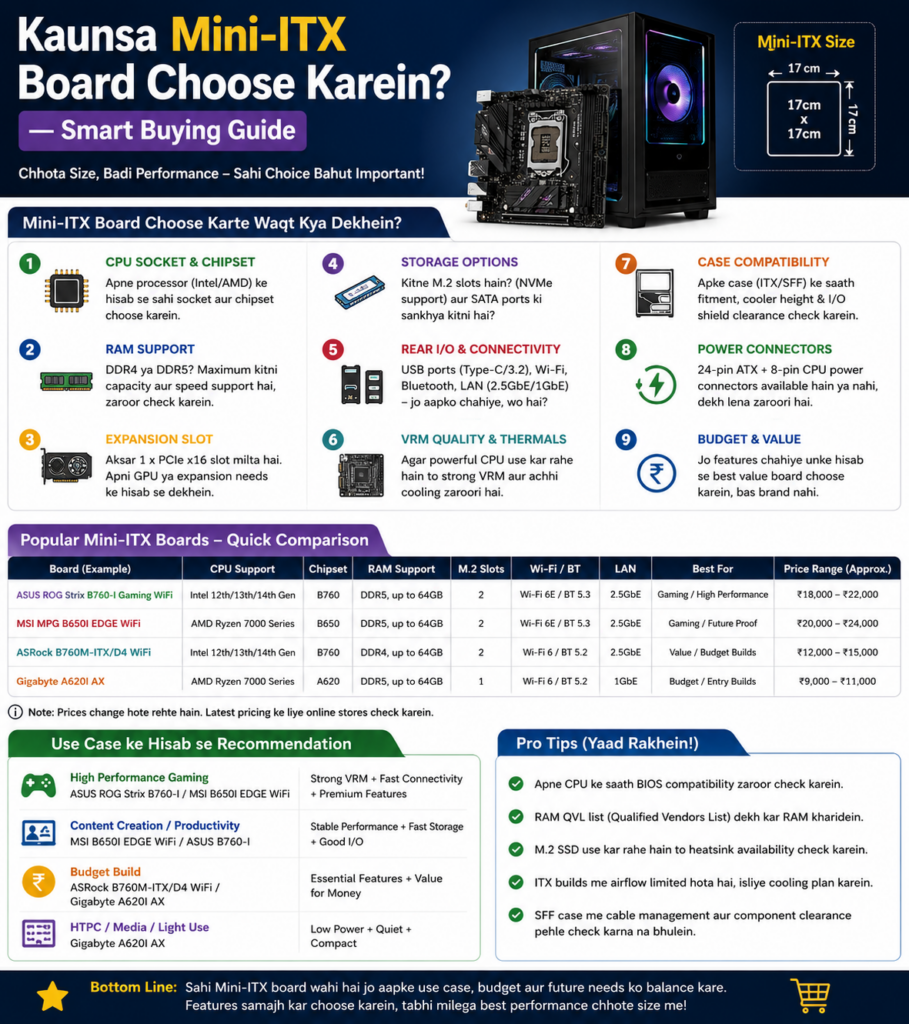
Budget Ke Hisaab Se
- ₹10,000 – ₹18,000: ASRock B850M-ITX — beginners ke liye best value entry-level Mini-ITX board
- ₹18,000 – ₹28,000: Gigabyte Z790I Aorus Ultra Lite — mid-range mein best performance-per-rupee
- ₹28,000 – ₹45,000+: ASUS ROG Z890-I ya MSI MEG X870E — premium enthusiast builds ke liye
Use Case Ke Hisaab Se
- Pure Gaming Build: ASUS ROG Strix Z890-I Gaming WiFi — best Mini-ITX motherboard for gaming
- AMD Lover Hai: MSI MEG X870E Ace — Ryzen ke saath unbeatable
- Video Editing / Creation: ASUS ProArt Z890-Creator WiFi ITX
- Beginner / First PC: ASRock B850M-ITX/ac — easy aur affordable
- Budget-Conscious Gamer: Gigabyte Z790I Aorus Ultra Lite — best mid-range pick
CPU Cooler Ka Dhyan Rakho
Mini-ITX builds mein CPU cooler ki height ek important factor hai. Noctua NH-L9i, NH-L12S, ya ID-Cooling IS-60 EVO jaisi low-profile coolers recommend ki jaati hain. Agar case bada hai toh 240mm AIO liquid cooler bhi fit ho sakta hai.
Remember: Mini-ITX board khareedne se pehle apna ITX case choose karo aur GPU ka length aur CPU cooler ki height zaroor check karo. Lian Li A4-H2O, NZXT H1 V2 aur Fractal Terra popular choices hain.
Frequently Asked Questions (FAQ)
Mini-ITX ka size sirf 170×170mm hota hai — itni chhoti jagah mein 4 RAM slots fit karna heat management aur signal integrity dono ke liye problematic ho jaata hai. Lekin good news yeh hai ki DDR5 technology ke saath aaj ek slot mein 32GB milti hai, isliye 2 slots mein bhi 64GB RAM possible hai — jo zyaadatar use cases ke liye kaafi se zyada hai.
Haan, bilkul! Z-series (Intel) aur X-series (AMD) chipset wale Mini-ITX boards full overclocking support karte hain. ASUS ROG Strix Z890-I aur MSI MEG X870E dono excellent overclocking options hain. Sirf B-series boards mein CPU overclocking limited hoti hai, lekin RAM XMP/EXPO support in sab mein hota hai.
Thoda zyada patience zaroor chahiye — chhoti jagah mein cable management tricky ho sakta hai. Lekin agar aap ek achhi build guide dekh ke systematically karo, toh koi problem nahi hoti. Beginners ke liye ASRock B850M ya Gigabyte Z790I jaise user-friendly boards se shuruwat karo. YouTube par ITX build guides bahut achhe aur detailed hain.
₹20,000 ke budget mein Gigabyte Z790I Aorus Ultra Lite aur ASRock B850M-ITX/ac dono excellent options hain. Intel platform prefer karte ho toh Z790I chunna, AMD chahiye toh B850M lo. Dono boards reliable hain, solid performance dete hain aur popular ITX cases ke saath easily compatible hain.
Dono platforms par excellent Mini-ITX options available hain. Intel (LGA 1851 socket) gaming mein slightly better single-core performance deta hai, jabki AMD AM5 platform future-proof hai aur long-term value zyada deta hai kyunki AM5 socket 2027 tak supported rahega. Budget tight hai toh AMD B850 platform slightly affordable padta hai.
ITX cases ke hisaab se PSU size vary karta hai. Zyaadatar ITX cases mein SFX ya SFX-L form factor PSU use hota hai — regular ATX PSU fit nahi hota. Corsair SF750 Platinum aur Seasonic Focus SFX-L 600W popular aur reliable options hain. Build shuru karne se pehle apne chosen case ki PSU compatibility zaroor check karo.
Conclusion — Kya Choose Karein? Final Advice
Yaar, Mini-ITX builds ab sirf “cute compact PC” nahi balki genuinely powerful, future-ready machines ban gayi hain. Chhota size matlab performance mein compromise bilkul nahi — sirf smart planning ki zaroorat hai.
Summary yaad rakho:
- Best overall gaming: ASUS ROG Strix Z890-I Gaming WiFi
- Best AMD platform: MSI MEG X870E Ace Mini-ITX
- Best value mid-range: Gigabyte Z790I Aorus Ultra Lite
- Best for beginners: ASRock B850M-ITX/ac
- Best for creators: ASUS ProArt Z890-Creator WiFi ITX
Apna budget decide karo, CPU platform suno, aur case compatibility check karo — phir confidently apna dream compact PC build karo. All the best! 🎯
Note: Prices approximate hain aur market ke hisaab se change ho sakte hain. Purchase karne se pehle latest pricing verify karein.