 admin
admin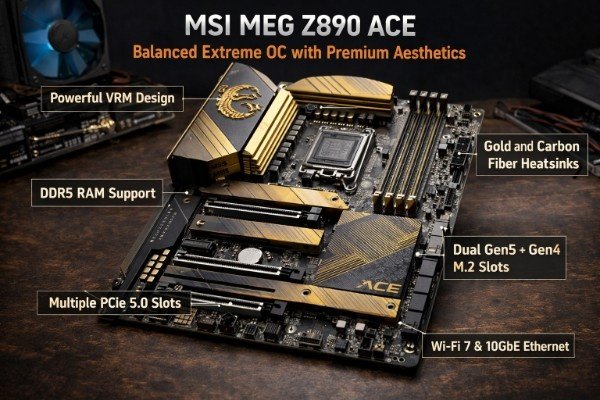
Overclocking ek art hai — aur har art ke liye sahi tools chahiye. Agar aap apne CPU se wo performance nikalna chahte hain jo manufacturer ne stock mein lock ki hui hai, toh sirf ek powerful processor kaafi nahi hota. Aapko chahiye ek best motherboard for overclocking — ek aisi board jo robust VRM design, advanced BIOS features, superior power delivery, aur rock-solid thermal management ke saath aaye. 2026 mein OC motherboard market mein NVIDIA-era CPUs, AMD Ryzen 9000X3D series, aur Intel Core Ultra 200K — sab ke liye world-class options available hain. Is article mein hum unhi Top 5 boards ko closely examine kar rahe hain jo extreme overclocking ke liye genuinely built hain — beginners ke liye nahi, balki un logon ke liye jo apne rig ka last drop of performance extract karna chahte hain.
Overclocking Motherboard Mein Kya Hona Chahiye? — Basics First
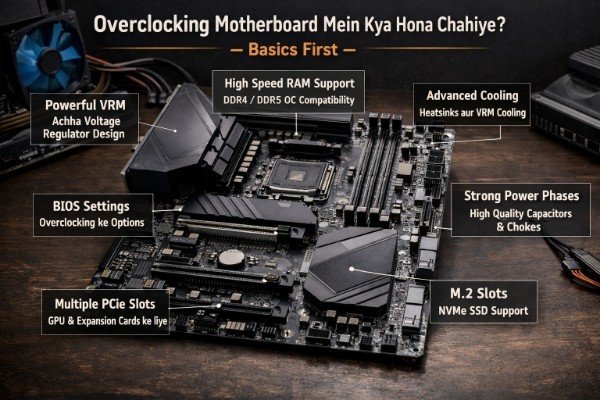
Pehle yeh samajh lein ke ek best motherboard for overclocking ko normal boards se kya alag banata hai. Jab aap CPU frequency aur voltage badhaate hain, toh board ko woh extra power cleanly deliver karni hoti hai CPU tak — bina any voltage ripple, thermal throttling, ya instability ke. Ek kamzor VRM design pe aggressive OC karne se board burn bhi ho sakta hai. Yeh 5 elements hain jo kisi bhi best motherboard for overclocking mein hone chahiye:
- High Phase-Count VRM: 16+ power phases with high-quality DrMOS or 90A+ MOSFETs — clean, stable voltage delivery.
- Robust BIOS with OC Features: Per-core tuning, voltage offset control, XMP/EXPO 3.0 support, enhanced LLC settings.
- Premium PCB Layers: 6-layer or 8-layer PCBs handle high-frequency signals better — critical for extreme OC stability.
- Strong Thermal Design: Massive VRM heatsinks, heat pipes, and even active cooling options keep MOSFETs cool under load.
- Comprehensive Diagnostics: POST code display, onboard power/reset buttons, BIOS flashback — must-haves for OC troubleshooting.
1. ASUS ROG Maximus Z890 Apex — The World Record OC Machine
Jab baat aati hai 2026 ke sabse capable best motherboard for overclocking ki, toh ASUS ROG Maximus Z890 Apex ka jawab dena padta hai — koi doubt nahi, koi debate nahi. Yeh board Intel LGA1851 socket pe based hai aur specifically extreme overclocking ke liye engineer kiya gaya hai — world record OC attempts ke liye use hone wala hardware. Iska 24+1+2 power stage design aur 110A Dr.MOS components isko ek different league mein rakhte hain.
Key Specifications
- Socket: LGA1851 — Intel Core Ultra 200K/200KS series
- Chipset: Intel Z890
- VRM: 24+1+2 power stages — 110A Dr.MOS per phase
- RAM: DDR5 up to 9600MHz+ OC — 2 DIMM slots (optimized for extreme OC)
- PCB: 8-layer extreme OC PCB with enhanced trace routing
- Storage: 5x M.2 PCIe 5.0/4.0 slots + 6x SATA 6Gbps
- Special: Onboard OC panel — frequency, voltage, BCLK knobs physical controls
- Diagnostics: Full POST code display + onboard power/reset buttons
- Connectivity: USB 4.0 Type-C (40Gbps), Thunderbolt 4, 10GbE LAN
- Price: Rs. 1,00,000 – 1,25,000 (Approx.)
Why It Dominates Overclocking
ASUS ROG Maximus series har saal world’s top overclockers ki first choice hoti hai — aur ROG Maximus Z890 Apex 2026 mein is tradition ko continue karta hai. Iska physical OC panel ek game-changer hai — aap BCLK (base clock) real-time mein knob ghuma ke adjust kar sakte hain, bina BIOS mein jaaye. Yeh feature serious OC sessions mein bohot waqt bachaata hai. 2-DIMM slot design (4 ki jagah) DDR5 signal integrity dramatically improve karta hai, jo 9000MHz+ RAM OC possible banata hai — kisi bhi best motherboard for overclocking mein yeh ek critical advantage hai.
Intel Core Ultra 9 285K is board pe 6.2GHz+ all-core OC achieve kar sakta hai with proper cooling — jo stock 5.7GHz boost se significantly higher hai. Liquid nitrogen cooling experiments ke liye bhi yeh board specially designed hai. Agar aap ek serious competitive overclocker ho ya ek extreme enthusiast, toh ROG Maximus Z890 Apex clearly the best motherboard for overclocking money can buy in 2026 hai.
Pros:
- World-class VRM — 110A Dr.MOS, 24-phase design
- Physical OC controls panel — unique aur extremely useful
- 8-layer PCB — extreme OC signal integrity
- 5x M.2 PCIe 5.0 slots — future-proof storage
Cons:
- Rs. 1 lakh+ price — not for everyone
- Only 2 DIMM slots — no 4-slot option
VERDICT: ASUS ROG Maximus Z890 Apex woh best motherboard for overclocking hai jo Intel platform pe 2026 mein koi competitor nahi rakhta — price justify karta hai agar extreme OC aapka goal hai.
2. MSI MEG Z890 ACE — Balanced Extreme OC with Premium Aesthetics
MSI MEG Z890 ACE woh best motherboard for overclocking hai jo extreme performance aur stunning visual design ko ek saath deliver karta hai. Yeh board Intel Z890 chipset pe based hai aur 24+1+1 power stage design ke saath aata hai jisme 105A SPS (Smart Power Stage) MOSFETs use hote hain — ASUS Apex ke direct competitor. MSI ka MEG series sirf gamers ke liye nahi, balki professional overclockers ke liye bhi equally respected hai.
Key Specifications
- Socket: LGA1851 — Intel Core Ultra 200K series
- Chipset: Intel Z890
- VRM: 24+1+1 stages — 105A Smart Power Stage MOSFETs
- RAM: DDR5 up to 9200MHz OC — 4 DIMM slots (max 256GB)
- Storage: 4x M.2 PCIe 5.0 slots + Lightning Gen 5 x4 support
- Special: OC Dashboard 2.0 — real-time OC monitoring hardware
- Networking: 10GbE + 2.5GbE dual LAN + Wi-Fi 7
- Display: 2.36-inch onboard color OLED status display
- Price: Rs. 85,000 – 1,00,000 (Approx.)
OC Performance Analysis
MSI MEG Z890 ACE ka 4-DIMM slot design isko ROG Apex se ek cheez mein aage rakhta hai — aap 4x32GB = 128GB DDR5 install kar sakte hain high-capacity builds ke liye. OC performance mein yeh board Intel Core Ultra 9 285K ko 6.0GHz+ all-core pe comfortably run kar sakta hai daily driver use ke liye. MSI ka BIOS interface — Click BIOS 5 — sabse user-friendly OC BIOS mein se ek hai, jo beginners aur veterans dono ke liye equally accessible hai. Yahi wajah hai ke yeh board best motherboard for overclocking category mein ROG Apex ke bilkul baad aata hai.
Wi-Fi 7 support aur dual LAN (10GbE + 2.5GbE) isko ek versatile choice banata hai un builders ke liye jo extreme OC ke saath saath high-speed networking bhi chahte hain. OLED status display ek practical feature hai — system stats, POST codes, aur custom messages show kar sakta hai.
Pros:
- 4 DIMM slots — 128GB DDR5 support
- 105A SPS VRM — excellent OC headroom
- Wi-Fi 7 + dual LAN — networking powerhouse
- Onboard OLED display — premium practical feature
Cons:
- Slightly below Apex in extreme OC ceiling
- High price — though justified by features
VERDICT: MSI MEG Z890 ACE best motherboard for overclocking hai jo 4 DIMM slots + Wi-Fi 7 + OLED display ke saath complete package deta hai — ROG Apex ka strongest challenger hai Intel platform pe.
3. ASUS ROG Crosshair X870E Hero — AMD Ka OC Throne
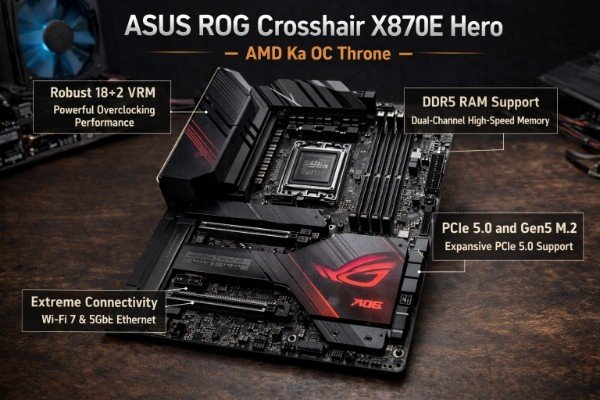
Intel boards ke baad — AMD platform pe kaunsa board extreme overclockers ki first choice hai? ASUS ROG Crosshair X870E Hero bina kisi doubt ke 2026 mein AMD Ryzen ke liye best motherboard for overclocking hai. AM5 socket, AMD X870E chipset, aur ek 20+2 power stage design ke saath yeh board Ryzen 9 9950X aur Ryzen 9 9950X3D jaise top-end processors ko unke maximum potential pe unleash karta hai.
Key Specifications
- Socket: AM5 — AMD Ryzen 9000 series + X3D support
- Chipset: AMD X870E
- VRM: 20+2 power stages — 110A teamed Dr.MOS
- RAM: DDR5 up to 8200MHz OC — 4 DIMM slots, max 256GB
- Storage: 5x M.2 slots (PCIe 5.0 x4 + PCIe 4.0) + 6x SATA
- PCIe: 2x PCIe 5.0 x16 slots — dual GPU / storage card support
- OC Features: ASUS AI Overclocking, per-core frequency tuning, EXPO 3.0
- Connectivity: USB 4.0 Gen 3×2 (80Gbps), Thunderbolt 5, 10GbE LAN
- Price: Rs. 75,000 – 95,000 (Approx.)
AMD OC Performance
AMD Ryzen 9000 series processors ka overclocking Intel se thoda alag hai — AMD mein Precision Boost Overdrive (PBO) aur Curve Optimizer zyada effective tools hain compared to traditional voltage/frequency OC. ROG Crosshair X870E Hero inka full potential unlock karta hai — ASUS AI Overclocking automatically Curve Optimizer values per-core basis pe tune karta hai, effectively giving you a personalized OC without manual effort. Yahi cheez ise AMD platform ka best motherboard for overclocking banati hai.
Ryzen 9 9950X is board pe PBO + CO tuning ke saath real-world workloads mein 8–12% performance gain milta hai stock se — bina any instability ke. 3D V-Cache wale processors (9950X3D) ke liye bhi Crosshair X870E Hero specially optimized hai — memory latency tuning aur cache frequency optimization ASUS BIOS mein excellent hai.
Pros:
- Best AMD OC board — PBO + AI tuning excellent
- Thunderbolt 5 + USB 4.0 Gen 3 — cutting-edge connectivity
- 5x M.2 slots — massive storage expansion
- 2x PCIe 5.0 x16 — multi-GPU/storage flexibility
Cons:
- AMD OC ceiling lower than Intel (architecture difference)
- Price is high — but justified for X870E platform
VERDICT: AMD platform pe best motherboard for overclocking ek hi hai — ASUS ROG Crosshair X870E Hero. Ryzen 9000 series users ke liye yeh ek no-brainer investment hai maximum performance ke liye.
4. Gigabyte Z890 Aorus Tachyon — World Record Challenger
Gigabyte ka Aorus Tachyon series naam hi kafi hai OC community mein — yeh boards specifically world record memory overclocking attempts ke liye design kiye jaate hain. Z890 Aorus Tachyon 2026 mein Intel platform pe DDR5 memory overclocking ke liye best motherboard for overclocking hai — especially un overclockers ke liye jo RAM speeds ko extreme levels pe push karna chahte hain.
Key Specifications
- Socket: LGA1851 — Intel Core Ultra 200K
- Chipset: Intel Z890
- VRM: 22+1+2 power stages — 105A MOSFETs
- RAM: DDR5 — 2 DIMM slots optimized for 10,000MHz+ OC
- Special: LN2 Mode switch — liquid nitrogen extreme cooling support
- PCB: 10-layer PCB — highest in consumer segment
- BIOS: Advanced OC BIOS with memory sub-timing control
- Diagnostics: POST code display, voltage measurement points onboard
- Price: Rs. 80,000 – 1,00,000 (Approx.)
What Makes Tachyon Special
Gigabyte Z890 Aorus Tachyon ka 10-layer PCB consumer segment mein ek rare feature hai — zyaada layers ka matlab better signal integrity aur lower noise floor hai, jo extreme DDR5 overclocking mein directly translate hota hai stability mein. Iska LN2 Mode switch ek hardware toggle hai jo liquid nitrogen cooling sessions ke liye board ko specially optimize karta hai — cold boot bugs bypass hote hain aur voltage behavior extreme temperatures pe stable rehta hai. Yeh clearly ek best motherboard for overclocking hai jo bench overclockers ke liye built hai.
Memory overclocking mein Tachyon ne DDR5-9600+ achieve kiya hai real-world testing mein — aur with extreme cooling aur binned memory kits, 10,000MHz+ possible hai. Agar aapka primary goal CPU + RAM OC dono mein records push karna hai, toh yeh board aapka weapon hai.
Pros:
- 10-layer PCB — best signal integrity in consumer market
- LN2 Mode — hardware switch for extreme cooling sessions
- DDR5 10,000MHz+ potential — world record level
- Onboard voltage measurement points — serious OC tool
Cons:
- Limited features for daily-driver use — focused on bench OC
- 2 DIMM only — no option for high-capacity memory builds
VERDICT: Memory overclocking aur extreme bench sessions ke liye Gigabyte Z890 Aorus Tachyon ek specialized best motherboard for overclocking hai — ordinary nahi, extraordinary hai yeh board.
5. MSI MEG X870E ACE — AMD Ka Premium Daily OC Beast
AMD platform pe ek alternative best motherboard for overclocking chahiye jo ROG Crosshair se thoda kam price pe aaye lekin OC performance mein koi serious compromise na ho? MSI MEG X870E ACE exactly wahi deliver karta hai. Yeh board AMD X870E chipset pe based hai aur 24+2+1 power stage design ke saath aata hai — AMD ke top-tier Ryzen 9000 processors ke liye a genuinely excellent OC platform.
Key Specifications
- Socket: AM5 — AMD Ryzen 9000 series + X3D models
- Chipset: AMD X870E
- VRM: 24+2+1 power stages — 105A SPS MOSFETs
- RAM: DDR5 up to 8000MHz OC — 4 DIMM slots, max 256GB
- Storage: 4x M.2 PCIe 5.0/4.0 + 6x SATA 6Gbps
- Special: MSI OC Engine 3 — hardware OC tuning dial onboard
- Networking: 10GbE + Wi-Fi 7 built-in
- BIOS: Click BIOS 5 with EXPO 3.0 + PBO2 + Curve Optimizer
- Price: Rs. 65,000 – 80,000 (Approx.)
Daily OC + Extreme Tuning Balance
MSI MEG X870E ACE ka onboard OC Engine 3 dial ek practical feature hai jo BIOS mein bina jaaye quick performance profiles switch karne deta hai — stock, mild OC, aggressive OC. Daily use karte waqt yeh extremely convenient hai. 24-phase VRM design Ryzen 9 9950X ko 5.0GHz+ mein push karne ke liye sufficient power provide karta hai — aur thermals bhi impeccable hain bade heatsink design ki wajah se. Yeh combination ise best motherboard for overclocking banata hai jo extreme bench sessions ke saath saath daily productivity mein bhi equally comfortable hai.
Wi-Fi 7 aur 10GbE dual connectivity is price range mein exceptional value hai. AMD EXPO 3.0 memory profiles ke saath DDR5-7200+ easily achievable hai out-of-the-box — beginners bhi ek click mein significant memory OC kar sakte hain. Experienced overclockers ke liye manual sub-timing control bhi fully available hai BIOS mein.
Pros:
- 24-phase VRM — excellent daily OC + extreme session balance
- OC Engine 3 dial — quick profile switching without BIOS
- Wi-Fi 7 + 10GbE — best networking combo at this price
- EXPO 3.0 — beginner-friendly DDR5 OC, one-click
Cons:
- Slightly below Crosshair X870E Hero in top OC ceiling
- Fewer M.2 slots than ROG offering
VERDICT: AMD platform pe best motherboard for overclocking chahiye jo daily use aur weekend OC sessions dono handle kare? MSI MEG X870E ACE woh smart, balanced choice hai jo ROG ke near-performance at lower price deta hai.
Side-by-Side Comparison: Top 5 OC Motherboards 2026
| Board | Platform | VRM Phases | Max DDR5 OC | Special OC Feature | Price |
| ASUS ROG Maximus Z890 Apex | Intel Z890 | 24+1+2 (110A) | 9600MHz+ | Physical OC Panel + Knobs | Rs. 1,00,000–1,25,000 |
| MSI MEG Z890 ACE | Intel Z890 | 24+1+1 (105A) | 9200MHz | OC Dashboard 2.0 + OLED | Rs. 85,000–1,00,000 |
| ASUS ROG Crosshair X870E | AMD X870E | 20+2 (110A) | 8200MHz | AI OC + Curve Optimizer | Rs. 75,000–95,000 |
| Gigabyte Z890 Aorus Tachyon | Intel Z890 | 22+1+2 (105A) | 10,000MHz+ | LN2 Mode + 10-layer PCB | Rs. 80,000–1,00,000 |
| MSI MEG X870E ACE | AMD X870E | 24+2+1 (105A) | 8000MHz | OC Engine 3 Dial | Rs. 65,000–80,000 |
Overclocking Shuru Karne Se Pehle — 5 Zaroori Safety Rules
Ek best motherboard for overclocking hona kaafi nahi hai — OC karte waqt kuch basic safety rules follow karna zaroori hai warna hardware damage ho sakta hai. Yeh 5 rules hamesha yaad rakhein:
- Cooling First: CPU cooler 240mm AIO minimum chahiye OC sessions ke liye — ideally 360mm AIO ya custom water loop.
- Gradual Increments: Ek baar mein 100MHz se zyada frequency na badhaayein — stability test karte hue step-by-step aage badhein.
- Stability Testing: Cinebench R23, OCCT, aur Prime95 se minimum 30-minute stability test zaroor karein har OC level pe.
- Voltage Limits: Intel Core Ultra 200K ke liye 1.40V se zyada Vcore na jaayein daily use mein — extreme bench only mein 1.45V acceptable hai.
- BIOS Backup: OC settings save karne se pehle stable profile ka backup zaroor rakhein — BIOS Flashback feature lifesaver hai.
Intel vs AMD — Overclocking Mein Kaunsa Platform Better Hai?
Yeh 2026 ka ek common confusion hai — especially naye overclockers mein. Dono platforms mein best motherboard for overclocking available hain, lekin OC approach fundamentally different hai:
- Intel Core Ultra 200K: Traditional frequency + voltage OC — zyada headroom, higher absolute frequencies possible (6GHz+). Best for pure CPU benchmark records.
- AMD Ryzen 9000: PBO + Curve Optimizer approach — per-core optimization. Less voltage stress, longer CPU life. Best for daily-use performance gains aur gaming OC.
- Memory OC: Intel platform DDR5 memory overclocking mein clear winner hai — 10,000MHz+ possible. AMD mein 8000MHz+ achievable hai lekin ceiling lower hai.
- Ease of OC: AMD ka AI-based auto-OC (ASUS AI OC, MSI PBO2) beginners ke liye easier hai. Intel mein manual tuning zyada knowledge maangta hai.
Frequently Asked Questions (FAQs)
Q1: Kya overclocking se CPU damage ho sakta hai?
Ans: Agar sahi tarike se kiya jaaye — proper cooling, safe voltage limits, aur stability testing ke saath — toh overclocking se CPU ko long-term damage nahi hota. Ek best motherboard for overclocking mein built-in protections (OCP, OVP, thermal shutdown) hote hain jo emergencies mein system ko automatically protect karte hain.
Q2: Kya B-series boards pe overclocking hoti hai?
Ans: Intel B-series boards pe CPU overclocking nahi hoti (BCLK limited hai). AMD B650/B850 boards pe PBO aur Curve Optimizer kaam karte hain — lekin extreme OC ke liye Z890 (Intel) ya X870E (AMD) chipset waali best motherboard for overclocking hi invest karna chahiye.
Q3: OC ke liye kitna BIOS knowledge chahiye?
Ans: Beginners ke liye ASUS AI OC ya MSI PBO2 Auto Tuning ek-click solution hain. Advanced overclockers ke liye per-core tuning, memory sub-timings, aur voltage curves ka knowledge chahiye. Ek best motherboard for overclocking ka good BIOS dono levels ke users ko accommodate karta hai.
Q4: Kya overclocking se electricity bill badh jaata hai?
Ans: Haan — higher voltage aur frequency direct power consumption increase karte hain. Intel Core Ultra 9 285K stock pe ~253W TDP hai, jo aggressive OC ke saath 350–400W tak ja sakta hai full load mein. Is wajah se ek 1000W+ high-efficiency PSU aur best motherboard for overclocking dono essential investments hain.
Final Verdict — Aapke Liye Kaunsa OC Board Best Hai?
Apni needs ke hisaab se choose karein:
- Intel extreme OC — no compromise: ASUS ROG Maximus Z890 Apex — best motherboard for overclocking, period.
- Intel extreme OC + daily driver balance: MSI MEG Z890 ACE — features + OC ka perfect combo.
- AMD Ryzen 9000 maximum OC: ASUS ROG Crosshair X870E Hero — AMD ka undisputed OC king.
- Memory world record attempts: Gigabyte Z890 Aorus Tachyon — LN2 + 10-layer PCB, no competition.
- AMD OC + value-conscious: MSI MEG X870E ACE — best budget among premium best motherboard for overclocking options.
Overclocking ek journey hai — aur is journey mein sahi board choose karna aapka sabse important decision hai. Chahe aap Intel pe world records todna chahte ho ya AMD pe smooth daily OC karna chahte ho — upar di gayi list mein aapka perfect best motherboard for overclocking zaroor maujood hai. Apna platform choose karein, apna budget decide karein, aur apne CPU ki hidden performance ko unleash karne ka waqt aa gaya hai!